Book online
Trattoria del Borgo
Corso Roma 4, Turin
Seasonal Piedmontese cuisine, homemade pasta and a short wine list. Thirty seats, closed on Mondays.
 For restaurateurs
PlateOut helps people find the right place to eat for every occasion. Your venue is already in the directory, even if you do not use Plateform. If the “Book” button is not showing yet, here is why.
Corso Roma 4, Turin
Seasonal Piedmontese cuisine, homemade pasta and a short wine list. Thirty seats, closed on Mondays.
PlateOut is a discovery and booking channel designed to help people find the right place to eat. Every Italian restaurant already has a listing, completely free of charge.
PlateOut includes restaurants across Italy, even those without Plateform’s “Book a table” button, so visitors can find useful information to help them choose.
Opening hours, addresses, price ranges and photos are collected from public sources such as Google and brought together in a dedicated listing for each restaurant.
Venues using Plateform display a “Book a table” button, connected directly to the restaurant’s booking system.
PlateOut brings together restaurants across Italy, and many can also be booked in just a few clicks. This feature is available exclusively to venues using Plateform to manage their bookings. Here is how to enable it 👇🏻
Request a demo to see the software in action and discover what it can do for you, from booking management to marketing.
Request a free demoSet up dining areas, service slots, capacity, booking rules and more with guided configuration.
Guided setupActivating Plateform also enables the “Book a table” button on your PlateOut listing, allowing customers to book directly.
Booking enabled
PlateOut is where customers find you. Plateform is the platform you use to manage bookings, your dining room, customers and marketing. When the two are connected, bookings go straight from your venue’s listing to your diary.
In short: PlateOut is the channel where customers find you; Plateform is the system you use to manage their bookings.
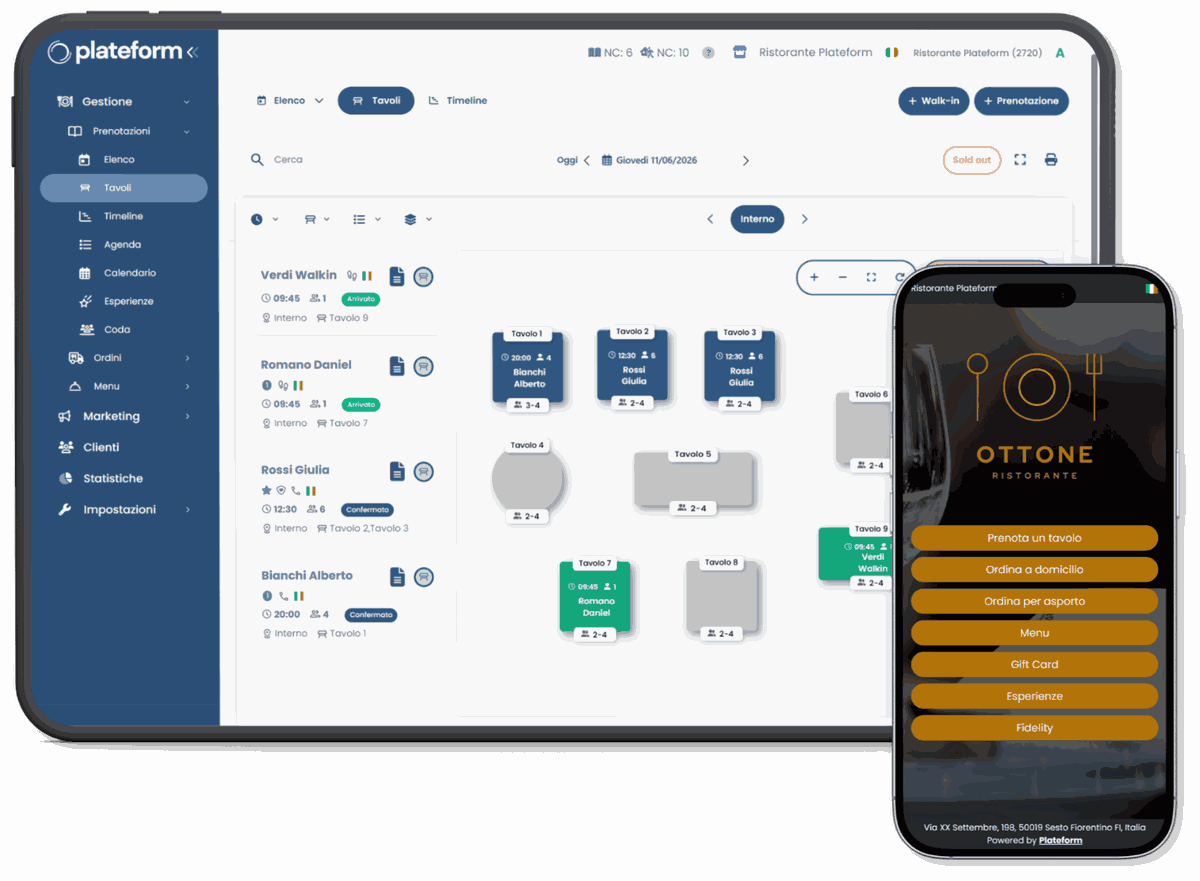
Configure dining areas, service slots, capacity and booking rules. Once your listing is connected, PlateOut can display the “Book” button.
PlateOut, your website, Google and phone: all bookings go into the same diary.
Confirmations, reminders and reconfirmation requests can be sent automatically through your configured channels.
Visit history, preferences and useful information stay in your venue’s CRM, with respect for privacy.
During a free 30-minute demo, we will show you the features live and answer your questions.
Plateform Premium brings together over 20 features to manage bookings and your dining room, get to know your customers, communicate with them and track your venue’s performance. It integrates seamlessly with dozens of different POS systems.
Online and phone bookings go into the same place. Configure service slots, dining areas and capacity around your service.
Booking confirmed. We look forward to seeing you on Friday at 20:30.
The form shows the availability you have configured. Automate confirmations, reminders and reconfirmation requests to reduce manual work before service.
The customer list keeps visit history and preferences. Use it to create segments and work with campaigns, loyalty programmes, promotions and automations.
Statistics, charts and indicators help you understand your venue’s performance and make better-informed decisions.
PlateOut is one of the channels. With Plateform, bookings from your website, Google, phone and other touchpoints all come together in the same system.
Wherever a booking starts, it is managed in a single diary.
The difference is simple: today PlateOut presents your venue; with Plateform, it can also send bookings straight to your diary.
Today Visitors can read your venue’s information, but cannot book online through PlateOut.
After Direct booking from your listing.
Today To book, customers need to use another channel, such as the phone.
After Bookings arrive in Plateform alongside those from your other channels.
Today PlateOut helps people find your venue, but does not manage bookings on your behalf.
After Bookings are direct: no per-cover commission, and customer data stays with your venue.
My favourite feature? It saves us from no-shows. Not 100% of them, but most.
It keeps the whole team up to date, from the kitchen to the dining room.
Excellent management software, both the free and paid versions. Comprehensive, intuitive and at the best price on the market.
No. Your venue’s PlateOut listing remains available for free, even if you do not use Plateform. To make it bookable, it needs to be connected to Plateform.
No. Bookings managed with Plateform carry no per-cover commission, either for the venue or for the person booking.
Your venue does. Data collected during booking can feed into your Plateform customer list, including visit history and preferences, in compliance with privacy regulations.
Not necessarily. Plateform can work alongside your existing tools and offers integrations with POS software, payment systems, Google and WhatsApp. We will review your needs during the demo.
You can keep using it: Plateform does not require exclusivity. Bookings received through Plateform are direct, with no per-cover commission.
Setup is guided. During the demo, we review your dining areas, service slots, capacity and service rules, then define the steps needed to get started together.
Plateform provides guided setup, training, live support, a Help Center and a Video Academy to help your team use the platform.
Leave your details and one of our consultants will contact you to understand your needs and arrange a free 30-minute demo of Plateform in action.
We will contact you on WhatsApp during business hours. In the meantime, you can return to your venue listing.